%22%3E%0A%3Cpath%20d%3D%22M412%20101.2H393.7C393.1%20101.2%20392.3%20100.9%20391.8%20100.5C377.3%2087.6004%20362.9%2074.6004%20348.4%2061.6004C344.8%2058.4004%20341.3%2055.2004%20337.7%2052.0004C337.1%2051.5004%20336.2%2051.1004%20335.5%2051.0004C334.2%2050.8004%20333%2051.0004%20331.5%2051.0004V101.1H316.7V0.100391H331.4V44.3004C331.9%2044.3004%20332.2%2044.4004%20332.5%2044.4004C334.9%2044.4004%20337.2%2044.5004%20339.6%2044.4004C340.4%2044.4004%20341.3%2044.0004%20341.8%2043.5004C351.6%2034.4004%20361.4%2025.2004%20371.1%2016.0004C376.5%2010.9004%20381.9%205.90039%20387.3%200.800391C387.9%200.200391%20388.5%200.000390626%20389.3%200.000390626H400.9C384.2%2015.8004%20367.8%2031.3004%20351.2%2047.0004C371.5%2065.0004%20391.8%2082.9004%20412.1%20100.9C412.1%20101%20412.1%20101.1%20412%20101.2ZM180.9%20101.2C184.1%2094.9004%20187.2%2088.9004%20190.3%2082.8004C198.3%2067.3004%20206.2%2051.8004%20214.2%2036.2004C220.3%2024.4004%20226.4%2012.5004%20232.4%200.700391C232.7%200.100391%20233%20-0.0996094%20233.7%20-0.0996094H248.1C248.8%20-0.0996094%20249.2%200.100391%20249.6%200.800391C256%2013.3004%20262.4%2025.7004%20268.8%2038.2004C279.3%2058.6004%20289.8%2079.0004%20300.3%2099.5004C300.5%20100%20300.8%20100.4%20301.1%20101.1C300.5%20101.1%20300.1%20101.2%20299.7%20101.2H286.5C285.6%20101.2%20285.1%20100.9%20284.7%20100.2C280.1%2091.3004%20275.4%2082.4004%20270.8%2073.4004C270.1%2072.1004%20269.3%2071.6004%20267.8%2071.6004H209.9C208.7%2071.6004%20208.1%2072.0004%20207.5%2073.1004C202.9%2082.1004%20198.2%2091.0004%20193.6%20100C193.1%20101%20192.6%20101.3%20191.5%20101.3C188.4%20101.2%20185.3%20101.3%20182.3%20101.3C182%20101.2%20181.6%20101.2%20180.9%20101.2ZM239.1%2011.4004C230%2029.2004%20221.1%2046.7004%20212.1%2064.3004H266.4C257.2%2046.7004%20248.2%2029.2004%20239.1%2011.4004ZM0%200.000390626H43.4C51.2%200.000390626%2058.7%201.20039%2065.7%204.80039C75.9%2010.0004%2078.9%2018.0004%2078.6%2027.4004C78.3%2034.3004%2076%2040.5004%2071.2%2045.5004C67.3%2049.6004%2062.4%2052.3004%2057.1%2054.3004C50.6%2056.7004%2043.9%2058.0004%2037.1%2058.6004C30.1%2059.2004%2023.1%2059.4004%2016.2%2059.7004C15.8%2059.7004%2015.3%2059.8004%2014.8%2059.8004V101.1H0.1C0%2067.4004%200%2033.8004%200%200.000390626ZM14.8%207.10039V52.2004C23.7%2052.4004%2032.6%2052.3004%2041.2%2050.1004C44.4%2049.3004%2047.6%2048.2004%2050.6%2046.7004C58.4%2043.0004%2062.3%2036.7004%2062.7%2028.0004C63%2019.9004%2059.5%2014.1004%2052.4%2010.5004C47.6%208.00039%2042.5%207.10039%2037.2%207.10039H14.8ZM95.9%20101.1V0.100391H167.3V7.20039H110.7V44.7004H158.1V51.9004H110.8V93.9004H171.1V101C146.1%20101.1%20121%20101.1%2095.9%20101.1Z%22%20fill%3D%22black%22%2F%3E%0A%3Cpath%20d%3D%22M35.0004%2025.7996H42.5004V20.6996H44.8004V33.1996H42.6004V27.5996H34.9004V33.2996H32.7004V20.7996H35.0004V25.7996ZM54.4004%2025.8996V27.2996H48.9004V31.6996H55.9004C55.9004%2032.1996%2056.0004%2032.5996%2056.0004%2033.0996H46.5004V20.5996H55.5004V21.8996H49.0004V25.7996C50.7004%2025.8996%2052.5004%2025.8996%2054.4004%2025.8996ZM25.9004%2033.0996H23.5004V21.9996H17.9004V20.6996H31.6004V22.0996H27.1004C26.2004%2022.0996%2025.9004%2022.2996%2025.9004%2023.1996C26.0004%2026.0996%2025.9004%2028.9996%2025.9004%2031.7996V33.0996Z%22%20fill%3D%22black%22%2F%3E%0A%3C%2Fg%3E%0A%3Cdefs%3E%0A%3CclipPath%20id%3D%22clip0_388_462%22%3E%0A%3Crect%20width%3D%22411%22%20height%3D%22101.2%22%20fill%3D%22white%22%2F%3E%0A%3C%2FclipPath%3E%0A%3C%2Fdefs%3E%0A%3C%2Fsvg%3E%0A)
10 AI tools every business should use in 2026
AI is no longer just for drafting emails or brainstorming ideas. There’s now a tool built for almost every part of running a business. Here are 10 worth knowing, from accounting and HR to sales and time management.
By Jodie Wong /

Share this article
Just a few years ago, using AI at work meant asking a chatbot to write an email or help generate ideas. Today, there’s an AI tool for almost every part of a business, from recruitment and accounting to project management.
Repetitive, time-consuming tasks like taking meeting notes, processing payroll and creating presentations can now be handled by specialised AI tools. With so many options available now, here are 10 AI tools worth considering for your business.
Claude
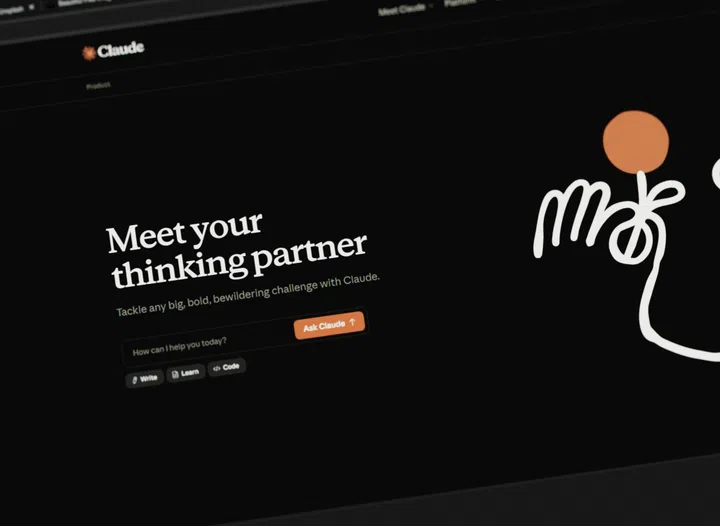
Claude has become one of the most popular AI chatbots for businesses and is often considered one of the strongest options available. Developed by Anthropic, it is particularly useful for users who work with long documents and complex information.
One of its key strengths is its ability to process large volumes of text in a single conversation. Businesses have found it useful for a range of activities, from reviewing contracts and spreadsheets to simplifying technical jargon.
For teams, Claude Projects lets users create dedicated workspaces to store company documents, brand guidelines, and templates for future conversations. This gives Claude ongoing context, so users do not have to upload the same files or repeat the same information every time they start a new chat.
Technical teams can also use Artifacts, which lets them edit and test code, charts, and simple web applications without leaving the conversation.
Gemini for Google Workspace

For businesses already using Google Workspace, Gemini is integrated into familiar tools like Gmail, Google Docs, and Google Meet. Instead of switching between apps or copying information into a separate chatbot, users can draft emails, summarise documents, and answer questions about files without leaving their current workspace.
It can also help employees create presentations and spreadsheets, even without advanced design or spreadsheet skills. In Google Slides, users can create images or entire presentation decks from a simple prompt. Google Sheets can identify patterns, fill in missing information, and build customised project trackers.
Since Gemini is built into Google Workspace, it comes with enterprise security and privacy controls, meaning business data is not used to train Google’s public AI models.
Xero
Accounting can be one of the most time-consuming parts of running a business, particularly for small business owners and freelancers. Xero is a cloud-based accounting platform that lets businesses track cash flow, create invoices, and monitor incoming payments in one place. Users can also connect their bank accounts so transactions are imported automatically, reducing manual data entry.
Xero also includes Analytics Plus, an AI-powered tool that forecasts cash flow up to 90 days ahead. It can send automatic invoice reminders to clients with overdue payments and use machine learning to match bank transactions to invoices and business expenses.
Instead of waiting until the end of the month to review their finances, business owners have a clearer view of how money is moving through the business.
Aspire

Founded in Singapore, Aspire is a digital financial platform built for startups and SMEs. As a business grows, managing finances becomes more complicated, with processes such as expense tracking, supplier payments, and company cards often spread across multiple platforms. The platform brings these tasks together in one place.
Its AI also helps match receipts to expenses, automate parts of the accounts payable process, and integrate with accounting platforms such as Xero and QuickBooks.
Companies operating across different markets can also use Aspire’s multi-currency accounts, which support more than 30 currencies. Managers can issue physical and virtual corporate Visa cards to employees while setting individual spending limits. Aspire AI can automate routine finance tasks using simple text commands, such as creating a travel budget card for a team member.
Omni HR
Hiring across different countries brings a new set of challenges, from local payroll requirements to different employment regulations. Omni HR is a Singapore-based HR and payroll platform that brings together HR functions, including recruitment, onboarding, and multi-country payroll, onto one platform for businesses managing teams across Asia.
Instead of manually generating reports, users can ask Omni HR’s AI assistant, Mino, questions about employee data and receive answers almost instantly. The platform also helps businesses manage payroll and local compliance requirements across different markets.
In addition, managers can approve requests directly via Slack and Microsoft Teams, while employees can use the mobile app to clock in, submit expense claims, and check their leave balances.
Motion

Keeping track of meetings, deadlines and daily tasks can be overwhelming and time-consuming, particularly for businesses managing many projects at once. Motion is an AI-driven productivity tool that plans your workday by automatically scheduling tasks around your meetings and deadlines. Instead of manually updating your calendar, the platform prioritises tasks based on deadlines, available time, and workload, then adjusts your schedule as plans change.
Over time, Motion learns how you work by analysing your schedule and completed work, allowing it to organise your workload more effectively. Another common challenge is scheduling meetings with multiple participants.
The platform can check participants’ calendars to identify suitable meeting times and add the meeting to their schedules.
Notion
If your business already uses Notion to organise documents and projects, Notion AI works directly within your existing workspace. Instead of copying information into a separate chatbot, it understands the context of your notes and databases. It can summarise documents, translate text, and answer questions about information already stored in your workspace.
Notion AI can also help build and organise databases by adding properties, creating different views and retrieving information from existing databases. For example, you can ask which tasks are still blocked or what your team completed last quarter without having to search through rows of data.
This is especially useful for knowledge-heavy teams, including startups, consultancies, and small businesses that spend much of their day working across documents and projects.
HubSpot
HubSpot is a customer relationship management (CRM) platform used by sales and marketing teams to manage leads, deals, and customer data in one place. Its AI assistant, Breeze AI, handles many repetitive tasks that sales teams would otherwise handle manually.
One example is predictive lead scoring, which ranks potential customers by their likelihood of purchase, helping sales teams prioritise their follow-ups. Breeze AI can also forecast revenue using past sales and pipeline data, draft follow-up emails, and update customer records.
HubSpot also has a network of certified partners in Singapore, making it easier for local businesses to get support with implementation and training.
Otter AI

Keeping up with meeting notes can be distracting, especially during long discussions or calls with multiple participants. Otter AI is a meeting assistant that joins Zoom, Microsoft Teams, and Google Meet calls to transcribe conversations in real time. It can distinguish among different speakers and generate a live transcript, allowing users to stay focused on the discussion.
Aside from producing a full transcript, Otter AI also drafts summaries of key points, highlights action items, and identifies the main topics discussed. Users can search the transcript, ask questions such as what was decided in a meeting and draft follow-up emails.
Canva

For businesses without an in-house design team, Canva has become much more than a graphic design tool. Powered by Magic Studio and Canva AI, it allows users to create presentations, social media posts and marketing materials using simple text prompts. The designs remain fully editable, making it easy to fine-tune layouts after the AI produces an initial version.
Users can also ask Canva to update existing designs, such as changing the style or making a presentation look more modern. Companies can upload their brand colours, fonts, and logos so that AI-generated designs remain consistent with their visual identity.
Beyond design, Canva Code creates interactive website elements from text prompts, while built-in AI tools can remove image backgrounds, design graphics, and synchronise video clips with audio.